👐TouchMe — the touch-to-MIDI instrument
Turns touch, skin, water, and flowers into music — alone or with a friend. Setup, the two-person demo, firmware updates, and no-sound fixes.
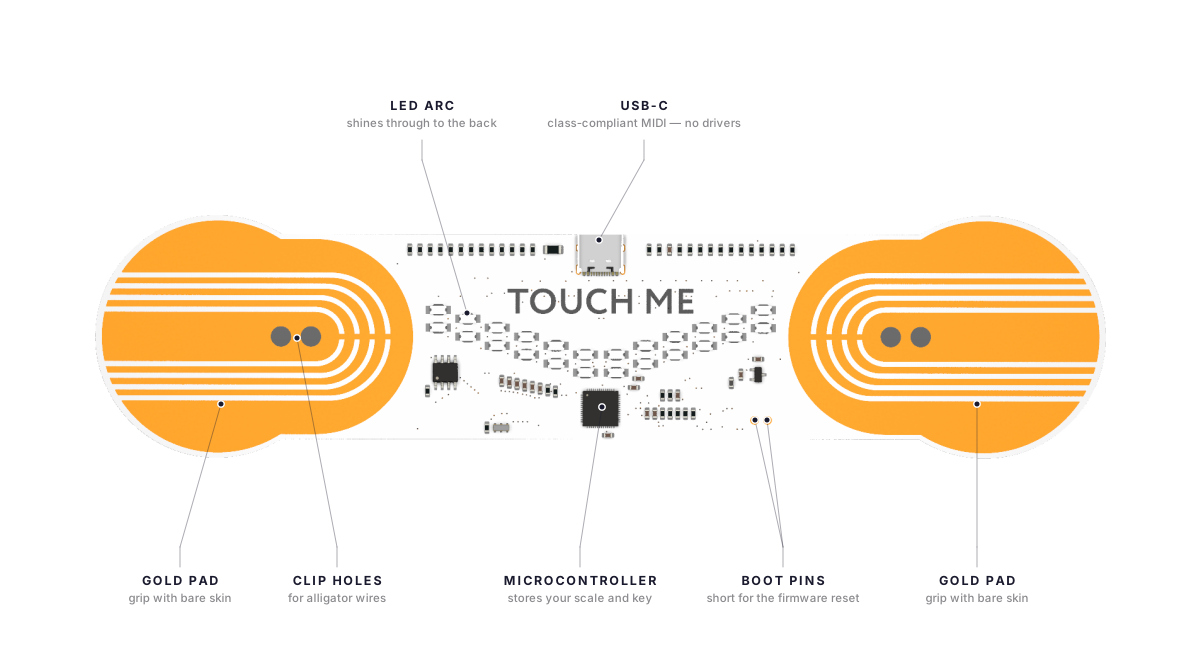
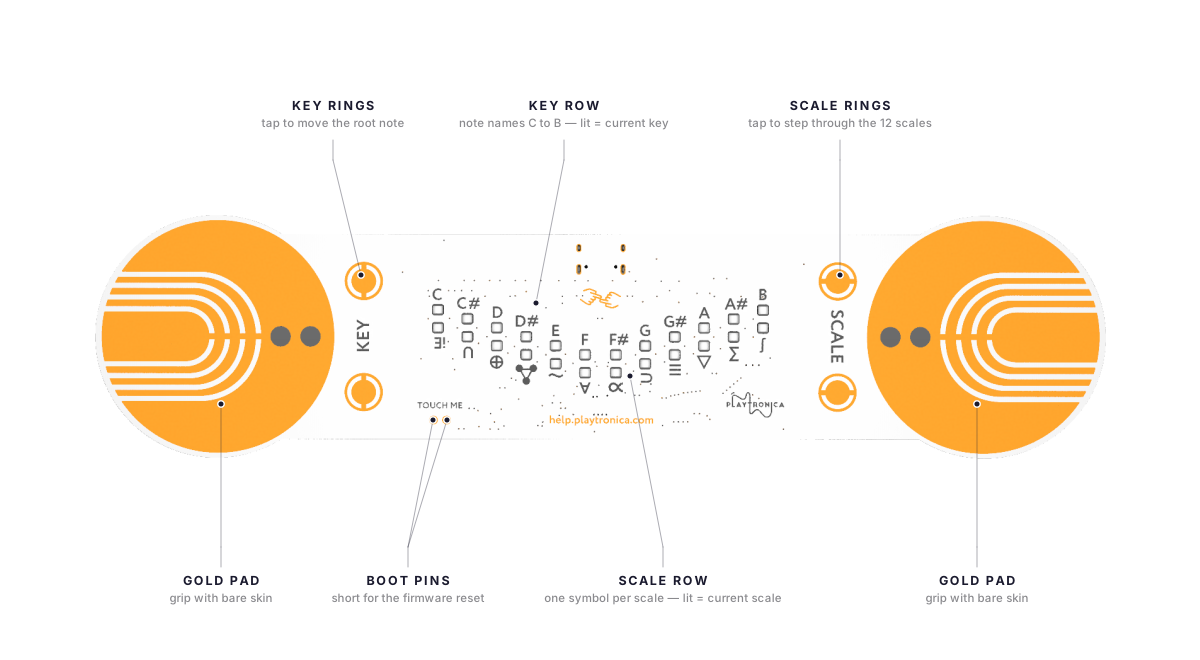
TouchMe is a small instrument with two gold pads. It turns skin, water, or flowers into sound. Touch both pads with bare skin and a note plays. The device measures the conductivity of whatever connects the two pads — your fingers, two people's hands, a glass of water, a wet leaf. A larger contact area produces a louder, brighter sound.
TouchMe is designed for shared play. The most surprising moment is when two people each hold one pad and touch each other — the circuit completes through both bodies, and the touch between them plays the music.
⚠️ Handle only the parts shown in this guide. Touch the gold conductive pads, the USB-C connector, and the electrode-patch clip points. Do not touch the narrow PCB bridge — it carries the microcontroller and surface-mount components. Even when the device is unplugged, do not touch solder joints, exposed chips, or the underside of the PCB. TouchMe is durable, but those areas can be damaged permanently.
⚠️ Not waterproof. Do not use with pacemakers. TouchMe is safe at USB voltage but the device should not be submerged, and people with pacemakers or other implanted medical devices should not use it as a precaution.
🛠️ Want to go deeper? When you are past the basics, see the TouchMe deep dive for MIDI output, hardware tuning, and performance tips. The tuning page covers the scale presets, the SCALE and KEY touch rings, and the symbols on the back.
🛒 Don't have one yet? Buy TouchMe on shop.playtronica.com — White or Black (Limited).
The two-person demo — the moment that defines TouchMe
This is the demonstration we run at every workshop. It is the simplest way to understand what TouchMe is.
- Two people stand next to TouchMe.
- Person A holds one gold pad with one hand. Bare skin.
- Person B holds the other gold pad with one hand. Bare skin.
- The two people touch each other — palm to palm, fingertip to forearm, anywhere bare skin meets bare skin. A note plays.
- The touch between the two people becomes the instrument. A high-five plays a short note. A long handshake plays a sustained note. A hug plays a chord.
The music does not come from the device. The music comes from the connection between two people. TouchMe makes it audible.
Three ways to play
Alone. Hold both pads with bare skin — one hand on each pad. A note plays as long as the circuit is complete. Move your fingers across the pads to change the volume and brightness.
With a friend. The two-person demo above. The most common workshop demonstration.
With objects. Clip an alligator wire from one of the pads to anything that conducts a small amount of electricity — a piece of fruit, a glass of water, a wet leaf, aluminium foil, a damp piece of paper. Touch the clipped object and the other pad simultaneously. The object becomes a key. See Objects you can play for the full list.
💡 TouchMe playing on just one hand? When your computer is plugged into the mains, earth ground can "leak" into the circuit, so a single pad is enough to complete it. To restore the deliberate two-pad and two-person play, run on battery or add a USB isolator. Full explanation: Grounding — ground leaking.
Quick start — first sound in 2 minutes
- Plug TouchMe into your computer with the USB cable from the box. No drivers are required on Mac or Windows. The LED stays dark when you plug in — that is normal. If your computer has only USB-A ports, see Adapters.
- Open synth.playtronica.com in Chrome. Safari and Firefox do not support Web MIDI. Open the browser after plugging in the device so the browser detects it on page load.
- Choose a synth. Avoid synths marked "Playtron only" (such as WebSID Commodore 64). The default Dots Piano is the most reliable starting point.
- Hold both gold pads with bare skin. A note plays, and the light windows on the back follow your touch — that is how you know it is working. Try the two-person demo above.
What is in the box
- TouchMe device
- USB cable
- 2 alligator clips — for connecting to objects beyond your skin
- Storage envelope
Update the firmware
Update the firmware once per quarter, or when we ship a new release.
- Open settings.playtronica.com/#/touchme in Chrome.
- Click "Update Firmware". If a drive called
RPI-RP2appears on your computer, skip to step 4. - Follow the on-screen instructions to put TouchMe into update mode.
- Upload the latest firmware. The device reboots automatically.
Reset TouchMe (factory wipe)
Use the reset only if the firmware update will not start, or after a hardware fault.
- Short the BOOT pins. Connect the two small BOOT contacts on the PCB with tweezers, a paper clip, or a jumper wire.
- Plug in USB-C with the BOOT pins still shorted.
- Wait for the
RPI-RP2drive to appear on your computer, then release the pins. The window is brief. If the drive does not appear, try again. - Drag
flash_nuke.uf2onto theRPI-RP2drive. Wait for the device to reboot. - Open settings.playtronica.com/#/touchme and upload the latest firmware.
Test the MIDI signal with a monitor
A MIDI monitor shows whether TouchMe is sending any signal. Use it when you cannot tell whether the device or the synth is the problem.
Compatible monitors:
- MorningStar MIDI Monitor — online, runs in Chrome on any operating system.
- MIDI Monitor by Snoize — macOS only.
- Pocket MIDI — Mac, Windows, or iOS.
Steps:
- Plug in TouchMe first, then open MorningStar in Chrome. The browser scans for MIDI devices when the page loads. If you open the browser first, the device will not appear.
- Touch both pads and watch for messages on screen. You should see message type Note On and Note Off, a MIDI channel, a note number, and velocity 127. If messages appear, TouchMe is working. The problem is in your synth or browser.
- If TouchMe does not appear in the device list, close Chrome completely. Wait 5 seconds. Reopen the browser, reload MorningStar, and click the "Devices" button in the top right.
- If the device is listed but no messages appear, open Settings in MorningStar and confirm "Note On" is enabled. TouchMe sends only Note On and Note Off.
- If still no messages, try another computer. If no messages appear on any computer with any cable, the device is likely faulty. Email support@playtronica.com with the subject
Defective #[order number].
Works great with TouchMe
TouchMe ships with a USB cable and two alligator clips. These open up new ways to play.
- Patches for skin and plants — stick-on electrodes so you can play through your body without holding the pads. Ideal for the two-person demo and for performances. From €16.
- Orbita + TouchMe bundle — Orbita's rotating sequencer drives the rhythm while TouchMe plays the touch. Limited-edition black TouchMe included. €506.
- Playtron + TouchMe bundle — add Playtron and clip wires to fruit, plants, and water. Two instruments, a whole band at your fingertips. €163.
- iPhone Lightning adapter — play TouchMe into GarageBand or any MIDI app on iPhone and iPad. €21.
Related pages
- Compare all Playtronica devices — side-by-side spec matrix, what is in each box, software compatibility, prices.
- Accessories and add-ons — cables, adapters, patches, copper tape, and bundles.
Ask the community
🤝 Other Playtronica users have probably hit this before. The Playtronica Friends Facebook group has 4,400 members and is the fastest source of creative and technical help. Search the group's history first (use the magnifying glass at the top — try
playtron mobile no sound,all leds lit,touchme biotron no sound,koala sampler midi, or whatever fits your problem). If your question is not already answered, post a new one with a[Device]prefix in the title. See the community page for what to ask there and what to email instead.
Still stuck
Email support@playtronica.com. We aim for 24 hours, but a reply may take up to 3 business days.